Embroidery Machine Dealer vs Amazon: What to Know
Choosing between an embroidery machine dealer and Amazon? We reviewed the Brother models to help you decide where and what to buy.
 By EMS Team
Updated November 24, 2026
We earn a commission if you buy through links on this page, at no extra cost to you. Commissions do not affect how we rate products. As an Amazon Associate I earn from qualifying purchases. Learn more.
Buying an embroidery machine is a big decision, and where you buy it matters almost as much as which model you choose. In November, shoppers face a familiar question: buy from a local embroidery machine dealer or order from Amazon? This guide compares the Brother machines and explains how the two buying routes differ, so you can match your budget and support needs to the right option.
Short answer: a dealer suits you if you are new to hooping, stabilizer and tension and want in-person help with setup. Amazon may suit you if you already know the machine you want and mainly care about comparing listings and return terms. Either way, check who the seller is and what the warranty covers before you buy.
If you are still narrowing down machine types, our guide on what type of embroidery machine you need is a good starting point before you compare sellers.

Brother SE700 4x4 Embroidery Sewing Combo
- 4 in x 4 in
- Sew + embroider
- 135 designs
Good fit if
- Large built-in design and stitch library
- Wireless PC file transfer without USB
- Color touchscreen simplifies on-screen editing
- Bundle adds four hoops and 40 thread spools
- Compatible with Artspira and iBroidery
Skip it if
- 4 x 4 inch embroidery field limits larger projects
- Mid-range price positions it above entry machines
Paid link. We may earn a commission.

Brother PE800
- 5 in x 7 in
- Embroidery only
- 138 designs
Good fit if
- You only need embroidery and want a 5" x 7" field
- You are fine loading designs by USB
Skip it if
- You also want a sewing machine in the same unit
- You want wireless design transfer (not listed for this model)
Paid link. We may earn a commission.
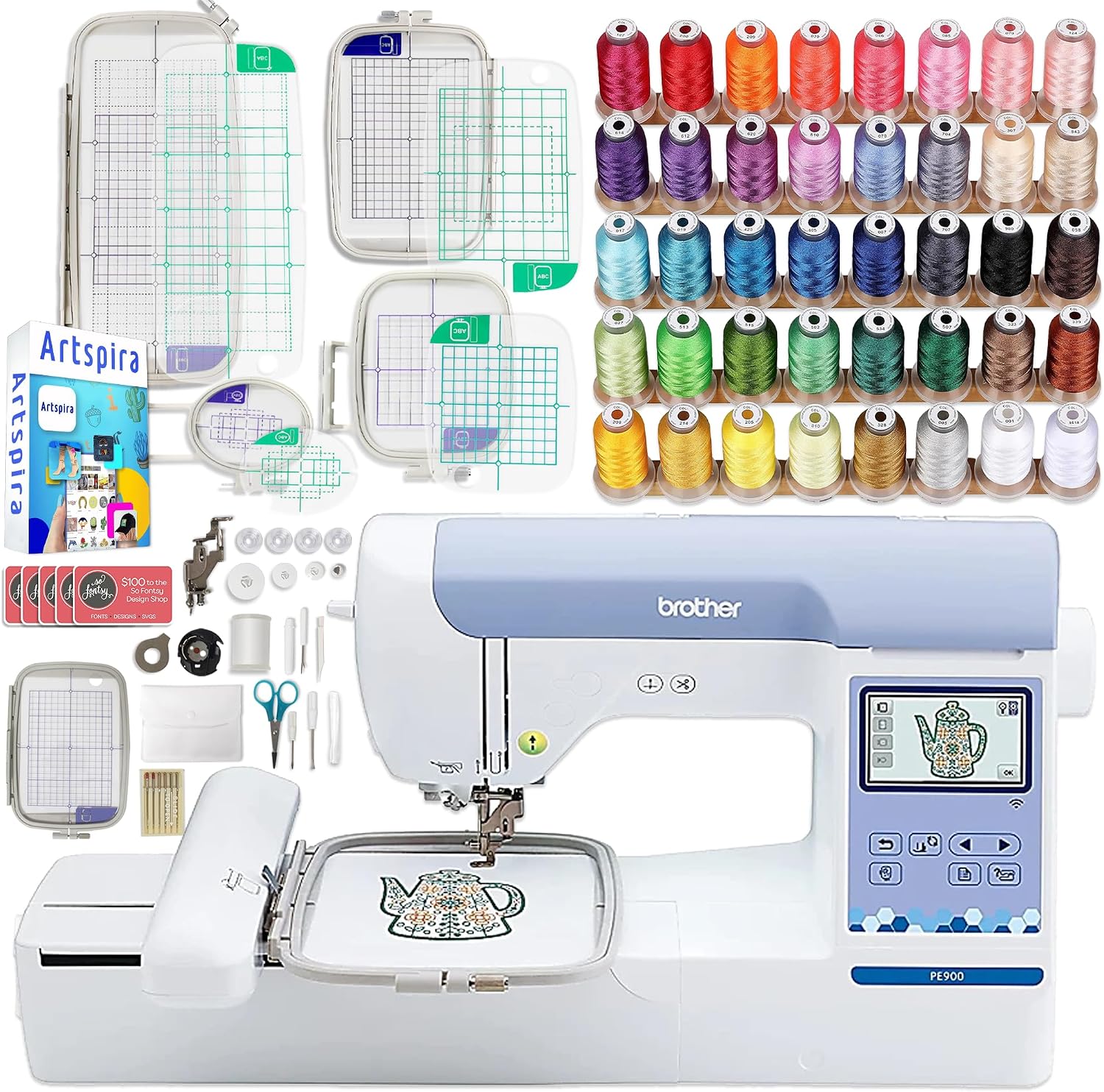
Brother PE900 5x7 Embroidery Machine Bundle
- 5 in x 7 in
- Embroidery only
- 193 designs
Good fit if
- Large 5 by 7 inch hoop area for bigger designs
- 193 designs and 13 fonts built in
- On-screen editing with zoom and letter editing
- Bundle includes five hoops and 40 thread spools
- Artspira app supports wireless design transfer
Skip it if
- Embroidery only, no sewing functions
- 20 pounds and 17 inches wide limits portability
Paid link. We may earn a commission.

Brother SE2000
- 5 in x 7 in
- Sew + embroider
- 193 designs
Good fit if
- You want one machine for sewing and 5" x 7" embroidery
- You value a larger built-in stitch selection and a knee lifter
Skip it if
- Your designs fit in 4" x 4" and you want to spend less
- You already own a sewing machine and only need embroidery
Check price on AmazonRead our full review
Paid link. We may earn a commission.

Brother SE700
- 4 in x 4 in
- Sew + embroider
- 135 designs
Good fit if
- You want one machine for sewing and small embroidery
- Your designs fit in 4" x 4"
Skip it if
- You expect to stitch designs larger than 4" x 4"
- You already own a sewing machine and only need embroidery
Check price on AmazonRead our full review
Paid link. We may earn a commission.
Embroidery Machine Dealer Vs Amazon: What to Compare Before You Buy
The dealer versus Amazon question really comes down to service, price, and convenience. The criteria below apply to both routes and to the machines themselves.
Service, Lessons, and Local Support
A dealer typically offers in-person demonstrations, setup help, and sometimes classes. That matters most for beginners who want guidance with hooping, stabilizer choice, and thread tension. Amazon cannot match that, but it does offer easy returns and a large review base you can read before ordering.
Ask a dealer what happens after the sale: who services the machine, whether loaner units exist, and what the warranty process looks like. With Amazon, check the listing for warranty terms and confirm the seller is authorized. Brother listings often state that products are intended for sale in the US at 120 volts, and other use may void the warranty.
Price and Bundle Value
Dealers sometimes bundle lessons or accessories into the price, while Amazon listings frequently include hoop sets, thread spools, and design cards. Compare what is actually in the box, not just the headline number.
| Model | Type | Max Embroidery Field | Built-in Designs | Best For |
|---|---|---|---|---|
| Brother SE700 Combo (bundle) | Sewing and embroidery | 4 x 4 in | 135 | Beginners who want thread and hoops included |
| Brother PE800 | Embroidery only | 5 x 7 in | 138 | Larger designs on a budget |
| Brother SE2000 | Sewing and embroidery | 5 x 7 in | 193 | Mixed sewing and embroidery work |
| Brother PE900 (bundle) | Embroidery only | 5 x 7 in | 193 | Dedicated embroiderers who want extras |
| Brother SE700 (standalone) | Sewing and embroidery | 4 x 4 in | 135 | Lowest entry point in the lineup |
Embroidery Field Size
The field size limits how large a single design can be. The SE700 models list a 4 x 4 inch field, while the PE800, PE900, and SE2000 list 5 x 7 inches. Never plan a project larger than the listed field. Some third party bundles include hoops larger than the machine's listed field, but the machine can still only stitch within its own field, so confirm in the manual which hoops it accepts before you design around them.
Designs, Fonts, and Connectivity
Built-in designs and fonts matter if you want to start without a computer. USB ports and wireless LAN let you transfer files, and the Artspira app adds drawing and download options. If file transfer matters to you, our comparison of the brother SE700 vs PE900 covers the differences in detail.
Sewing and Embroidery in One or Embroidery Only
Combo machines like the SE700 and SE2000 also sew, with 103 and 241 built-in stitches respectively. Embroidery-only models like the PE800 and PE900 focus on stitching designs. If you mainly embroider, an embroidery-only machine may suit you better. If you want one machine for garments and monograms, a combo makes more sense. Our embroidery machine vs hand embroidery guide helps you weigh the tradeoffs.
Who should skip this route
- Skip Amazon if you are new to hooping, stabilizer and tension and want in-person help with setup.
- Skip the dealer route if you already know the machine you want and mainly care about comparing listings and return terms.
- Skip either route until you have checked who the seller is and what the warranty covers.
What we could not assess
Dealer pricing, local service quality and the warranty handling of any specific seller, because they vary by dealer and we compare listings and manufacturer documents, not our own purchases. We did not verify seller authorization on any listing. How We Review lists the limits of our method.
Why You Should Trust Us
This guide is based on manufacturer specifications and listing information for the Brother machines. We do not conduct our own product trials. We compared field sizes, built-in design counts, connectivity, and bundle contents, and we noted where the data leaves questions open. Ratings and review counts are reported as they appear in the product data.
We do not claim to have used these machines. Where a spec is unclear or conflicting, we tell you to check the manual or spec sheet rather than guess.
Final Thoughts
For most buyers, the Brother SE2000 is the best overall pick. It combines a 5 x 7 inch field, 193 built-in designs, 241 sewing stitches, and wireless connectivity, so it covers both sewing and embroidery without a second machine. Skip it if you only embroider and want to spend less.
The Brother SE700 standalone is the simpler pick, and the bundle version adds hoops and 40 thread spools for beginners who want supplies in the box. The Brother PE900 bundle suits embroiderers who want a 5 x 7 inch field plus extras. The PE800 remains a solid embroidery-only option. See our other machine comparisons if you are weighing brands.
Related guides
- Brother SE2000 Review: A 5×7 Combo for People Who Sew Often
- Brother SE700 Review: Who This 4×4 Sewing and Embroidery Combo Fits
- Embroidery Machine vs Sewing Machine: What Each Does and Which You Need
- Embroidery Machine vs Cricut: What Each Makes and Which to Buy First
FAQs
Is it better to buy an embroidery machine from a dealer or Amazon?
A dealer is better if you want demonstrations, setup help, and local service. Amazon is better for convenience, easy returns, and reading reviews before you buy. Check warranty terms either way.
What is the best embroidery machine dealer vs Amazon option for beginners?
The Brother SE700 is the easiest entry point, with 135 built-in designs and a 4 x 4 inch field. The bundle version adds hoops and thread so you can start stitching sooner. See our other machine reviews for another beginner option.
Can I embroider large designs on these machines?
No. Each machine has a maximum field, either 4 x 4 or 5 x 7 inches. Designs larger than that field need to be split or stitched on a machine with a larger field.
Do I need the Artspira app?
No, but it adds free designs and lets you draw patterns on a mobile device and transfer them wirelessly on supported models. Check the listing to confirm app support for your machine.
Sources
- Amazon product listings for Brother SE700 4×4 Embroidery Sewing Combo (B0FR9T37F4), Brother PE800 (B07C7HNX92), Brother PE900 5×7 Embroidery Machine Bundle (B0FR9SZHGF), Brother SE2000 (B0B835KJFF), Brother SE700 (B0B8DYP1RN), including listed specifications, features, and included accessories (accessed October 31 to November 1, 2026).
- Brother USA pages (read November 14, 2026): SE700, SE2000, PE800, PE900.
- Our related machine reviews linked in this article: Brother SE2000 Review: A 5×7 Combo for People Who Sew Often; Brother SE700 Review: Who This 4×4 Sewing and Embroidery Combo Fits.
This article was written by the Embroidery Machine Scout editorial team from manufacturer and listing information. We do not conduct our own product trials.
About the author
The Embroidery Machine Scout team is the site's operator, who also writes as Jordan Hale, and a partner who works on the site with them. The team compiles manufacturer specifications, user manuals, warranty terms, and patterns in owner feedback, and shows where each detail comes from. The team does not run its own machine trials.