Best Embroidery Machine for Free Motion Embroidery
Free-motion embroidery means dropping or covering the feed dogs and guiding the fabric by hand under a darning or quilting foot, unlike computerized hoop embroidery.
 By Jordan Hale
Updated November 15, 2026
We earn a commission if you buy through links on this page, at no extra cost to you. Commissions do not affect how we rate products. As an Amazon Associate I earn from qualifying purchases. Learn more.
Direct Answer: Free-motion embroidery requires dropping or covering the feed dogs so the sewist manually guides the fabric under a darning or spring-action quilting foot, unlike computerized hoop embroidery which uses automated carriage arms.
Free motion embroidery gives you control that built-in patterns cannot, but the machine you choose still shapes how much freedom you actually get. Hoop size, how easily you can import your own designs, and whether the machine also sews are the details that matter most. In this guide we compare the models for the best embroidery machine for free motion embroidery, based on manufacturer specifications and listing information. We do not conduct our own product trials. For a wider look at the category, see our hub on the best embroidery machines for home use. If you are still learning how wireless file transfer works, our guide to the wireless embroidery machine is a good starting point.

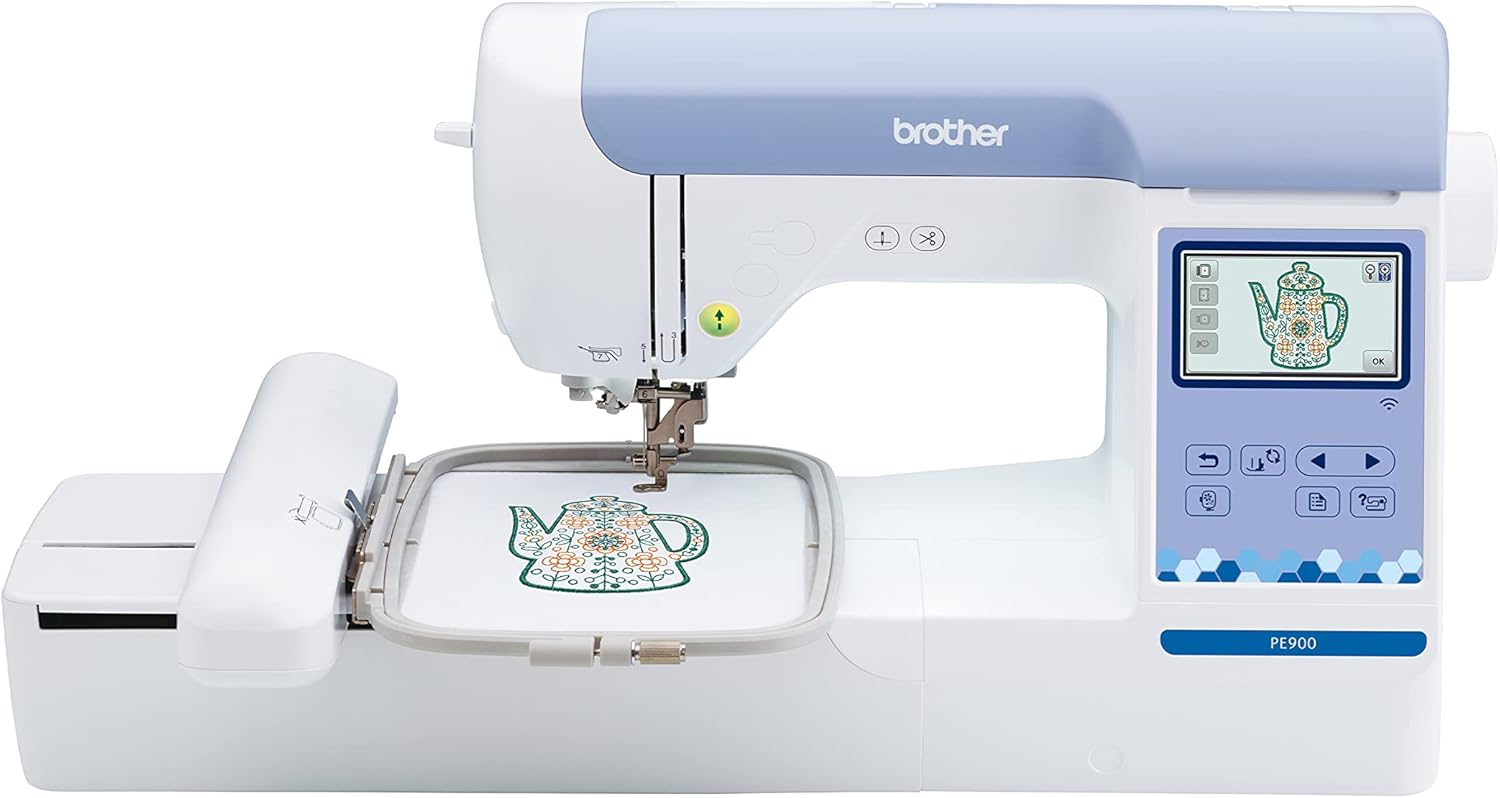
Brother PE900
- 5 in x 7 in
- Embroidery only
- 193 designs
Good fit if
- You only need embroidery and want a 5" x 7" field
- You want wireless design transfer
Skip it if
- You also want a sewing machine in the same unit
- Your designs fit in 4" x 4" and you want a smaller-field machine
Check price on AmazonRead our full review
Paid link. We may earn a commission.

Brother SE2000
- 5 in x 7 in
- Sew + embroider
- 193 designs
Good fit if
- You want one machine for sewing and 5" x 7" embroidery
- You value a larger built-in stitch selection and a knee lifter
Skip it if
- Your designs fit in 4" x 4" and you want to spend less
- You already own a sewing machine and only need embroidery
Check price on AmazonRead our full review
Paid link. We may earn a commission.

Brother SE700
- 4 in x 4 in
- Sew + embroider
- 135 designs
Good fit if
- You want one machine for sewing and small embroidery
- Your designs fit in 4" x 4"
Skip it if
- You expect to stitch designs larger than 4" x 4"
- You already own a sewing machine and only need embroidery
Check price on AmazonRead our full review
Paid link. We may earn a commission.
What to Look For in the Best Embroidery Machine for Free Motion Embroidery
Embroidery Field Size
The maximum embroidery field sets the ceiling on any single design, and free motion work is no exception. The Brother PE900 and Brother SE2000 both list a 5 by 7 inch field, while the Brother SE700 lists a 4 by 4 inch field. A larger field gives you room for bigger motifs and fewer re-hoopings, but it also means a larger machine footprint.
Do not assume a machine can stitch beyond its listed field, even if a bundle mentions a larger hoop. If hoop sizes in a listing seem to exceed the stated field, confirm in the manual which hoops the machine actually accepts before you buy.
Embroidery Only or Sewing Combo
The PE900 is an embroidery-only machine. Brother states plainly that it does not function as a traditional sewing machine, so it suits someone who already owns a sewing machine or only wants to embroider. The SE2000 and SE700 are combos, adding 241 and 103 built-in sewing stitches respectively.
For free motion embroidery specifically, an embroidery-only machine keeps the workflow focused. A combo makes more sense if you want one machine for piecing, construction, and decorative stitching. Our guide to embroidery machines for large designs explains how field size affects project planning.
Built-In Designs and Fonts
Built-in designs are a convenience, not a limit, but the numbers vary widely across these three models. The PE900 and SE2000 each list 193 built-in embroidery designs and 13 embroidery fonts. The SE700 lists 135 built-in designs and 10 fonts. All three connect to the Artspira app, which Brother says provides 50 free designs and lets you draw custom patterns on a mobile device.
If you plan to digitize your own artwork, read our explainer on what digitizing for embroidery machines involves so you know what file formats and software you will need.
Wireless Transfer and the Touchscreen
All three machines are wireless LAN enabled. Brother lists two transfer routes: the free Design Database Transfer software from a PC, or the built-in USB port. Each model has a color LCD touchscreen for on-screen editing, including resizing, rotating, repositioning, and combining designs, though the listed screen size varies by model, so check the spec sheet. If screen size and editing flow are priorities, our post on the embroidery machine with touchscreen covers what to look for.
Stitch Efficiency Features
The PE900 and SE2000 both list Advanced Color Sort, which reorders multi-color designs to reduce thread changes, plus Jump Stitch Trimming, which trims thread jumps within a color automatically. These features save time on complex designs and are worth checking on any machine you consider. The SE700 listing emphasizes its automatic needle threader and quick-set bobbin instead.
Free Motion Embroidery: What the Term Means for Your Machine
People use “free motion” in two ways. Some mean guiding the fabric by hand under the needle, which is a sewing technique. Others mean freely choosing and editing their own designs instead of relying on a fixed library. The machines here are computerized, so they stitch designs automatically, and their manuals are the place to confirm which stitching modes and presser feet each one supports.
If hand-guided stitching matters to you, a sewing and embroidery combo is the more flexible starting point, because it also has a standard sewing mode. If design freedom matters most, focus on field size, file transfer, and on-screen editing. Our embroidery machine hoop size guide explains how hoop size limits what you can stitch.
Setup Tips Before Your First Design
- Match the stabilizer to the fabric. Our embroidery stabilizer guide covers the main types.
- Check which file formats your machine reads before downloading designs. See embroidery file formats explained.
- Keep a few basic supplies on hand. Our list of machine embroidery supplies for beginners is a good checklist.
Who should skip these machines
- Skip these if you want the sewing technique called free motion embroidery, done by hand-guiding fabric under a darning foot; these are computerized embroidery machines that stitch stored designs.
- Skip the 4 x 4 inch SE700 if you stitch larger designs.
- Skip the PE900 if you also need to sew.
What we could not assess
Stitch quality, noise and long-term reliability, because we compare machines from listings and manufacturer documents, not our own use. The PE900, SE2000 and SE700 figures here (5 x 7 and 4 x 4 inch fields, 193 and 135 designs, 13 and 10 fonts, 241 and 103 stitches) match Brother’s pages. We found no Brother statement about free motion work, so the page only explains the term. How We Review lists the limits of our method.
How We Put This Guide Together
We did not stitch on these machines. This comparison is built from manufacturer specifications, feature lists, and the product data shown above. Where the data is silent, such as exact stitch speeds or hoop contents beyond what is listed, we say so rather than guess.
Our aim is to help you match a machine to your workspace, your budget tier, and the kind of free motion work you want to do, and to be clear about each model’s limits.
Final Thoughts
For most people shopping in this range, the Brother SE2000 Sewing and Embroidery Machine is the broadest pick. It combines a 5 by 7 inch field with 241 sewing stitches, 193 embroidery designs, and the same wireless and editing features as the PE900. Skip it if you already own a sewing machine you like.
The Brother SE700 Sewing and Embroidery Machine is the value pick. The Brother PE900 Wireless Embroidery Machine is the specialist choice for embroidery-only work, with the 5 by 7 inch field and 193 designs, but remember it cannot sew. For more options, browse our embroidery machine for bags guide.
Frequently Asked Questions
Can these machines handle free motion embroidery?
They are computerized embroidery machines with hoops and built-in designs, and their manuals describe the stitching modes each supports. Free motion work depends on the technique and accessories you use, so check the manual for guidance on hoop and foot options before you commit.
Do I need the Artspira app to use these machines?
No. Each machine has built-in designs and fonts and can transfer files by USB or Design Database Transfer. The Artspira app adds 50 free designs and on-device pattern drawing, which is a bonus rather than a requirement.
Which model has the largest embroidery field?
The PE900 and SE2000 both list a 5 by 7 inch field, while the SE700 lists 4 by 4 inches. If your projects regularly exceed 4 inches in either direction, the larger field models are the safer fit. Confirm hoop compatibility in the manual.
What is the best embroidery machine for free motion embroidery?
Based on the specifications we compared, the SE2000 is the most versatile because it pairs a 5 by 7 inch field with full sewing capability. The PE900 is the better fit for embroidery-only work, and the SE700 is the budget-friendly entry point. See our guide to designs included with embroidery machines for more context.
Related guides
- Best Embroidery Machines for Home Use: 7 Machines Rated on One Scale
- Brother PE900 Review: A 5×7 Embroidery-Only Machine With Mixed Customer Reviews
- Brother SE2000 Review: A 5×7 Combo for People Who Sew Often
- Brother SE700 Review: Who This 4×4 Sewing and Embroidery Combo Fits
- Best Embroidery Machines for Beginners: 5 Machines Rated
- Best Sewing and Embroidery Combo Machines: 3 Compared for Sewing
This article was written by the Embroidery Machine Scout editorial team from manufacturer and listing information. We do not conduct our own product trials.
Sources
- Manufacturer product pages: Brother PE900, Brother SE2000 and Brother SE700 (read November 15, 2026).
- Amazon product listings shown in the product blocks on this page, for listed specifications and included accessories.
About the author

Jordan Hale is a pen name used by the site's operator. Jordan researches and edits the buying guides at Embroidery Machine Scout. Jordan compiles manufacturer specifications, user manuals, and patterns in owner feedback to compare home and small-business embroidery machines. Jordan does not physically operate the machines reviewed here; every recommendation states its sources and the date they were checked.