Embroidery Machine for Bags: What to Check
Embroidering bags means balancing hoop size, fabric handling and design control, because bags are rarely flat and the fabric can be thick.
 By Jordan Hale
Updated November 15, 2026
We earn a commission if you buy through links on this page, at no extra cost to you. Commissions do not affect how we rate products. As an Amazon Associate I earn from qualifying purchases. Learn more.
Choosing an embroidery machine for bags means balancing hoop size, fabric handling, and how much design control you want. Bags are rarely flat, and the fabric can be thick, so the machine you pick needs to match the projects you plan to make. We reviewed the models in November 2026 to help you compare them side by side. If you are still deciding what type of machine fits your workflow, our guide on what type of embroidery machine you need is a good place to start.
Below you will find a comparison of the models we reviewed, followed by a buying guide that covers the factors that matter most for bag projects. We base our analysis on manufacturer specifications and listing information. We do not conduct our own product trials.

Brother SE700 4x4 Embroidery Sewing Combo
- 4 in x 4 in
- Sew + embroider
- 135 designs
Good fit if
- Large built-in design and stitch library
- Wireless PC file transfer without USB
- Color touchscreen simplifies on-screen editing
- Bundle adds four hoops and 40 thread spools
- Compatible with Artspira and iBroidery
Skip it if
- 4 x 4 inch embroidery field limits larger projects
- Mid-range price positions it above entry machines
Paid link. We may earn a commission.
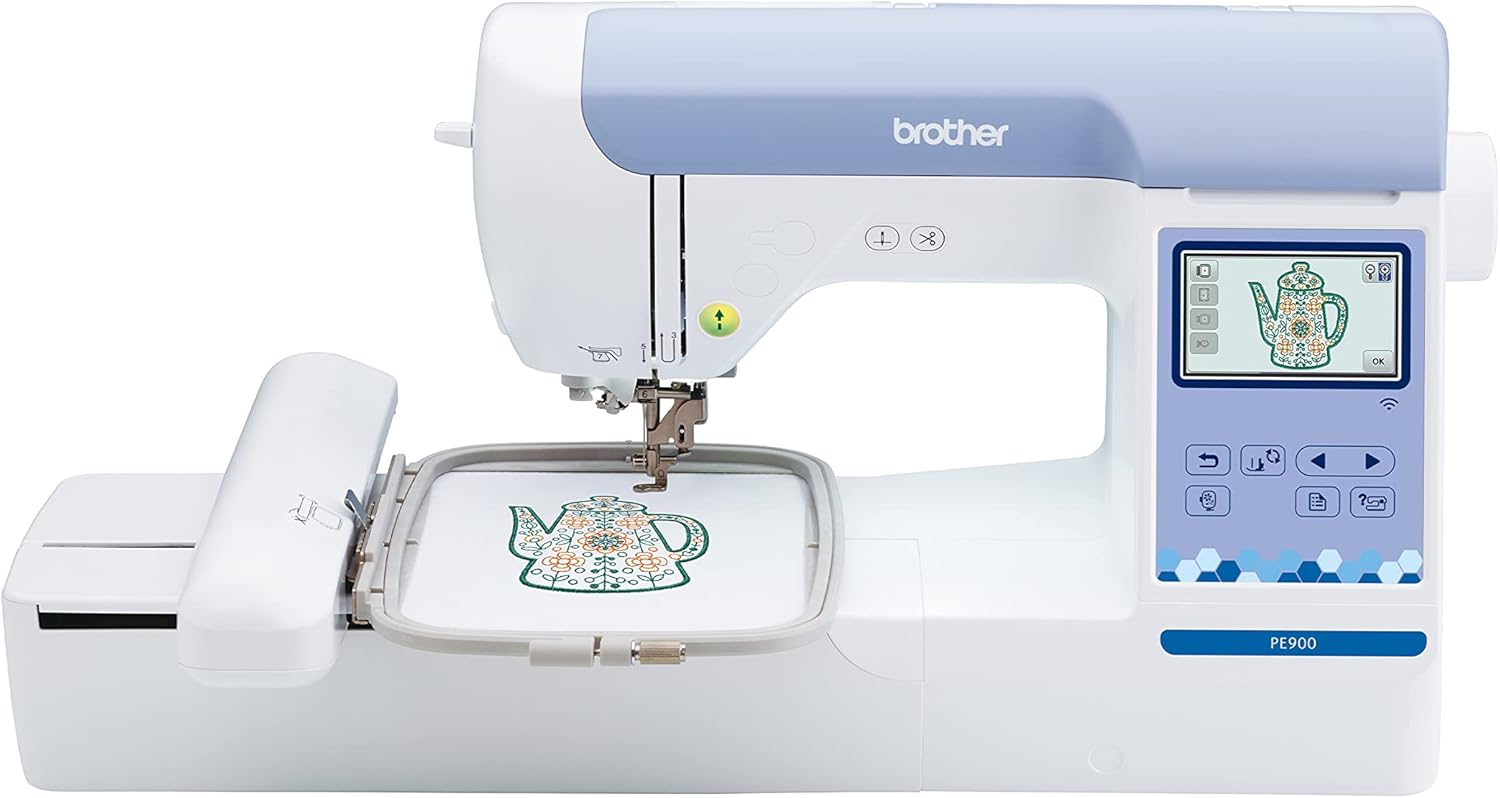
Brother PE900
- 5 in x 7 in
- Embroidery only
- 193 designs
Good fit if
- You only need embroidery and want a 5" x 7" field
- You want wireless design transfer
Skip it if
- You also want a sewing machine in the same unit
- Your designs fit in 4" x 4" and you want a smaller-field machine
Check price on AmazonRead our full review
Paid link. We may earn a commission.

Brother SE700
- 4 in x 4 in
- Sew + embroider
- 135 designs
Good fit if
- You want one machine for sewing and small embroidery
- Your designs fit in 4" x 4"
Skip it if
- You expect to stitch designs larger than 4" x 4"
- You already own a sewing machine and only need embroidery
Check price on AmazonRead our full review
Paid link. We may earn a commission.
Embroidery Machine For Bags Buying Guide
Before you compare models, it helps to understand what separates a good bag machine from a good general-purpose machine. The criteria below focus on the details that affect stitched results on totes, pouches, and structured bags.
Embroidery Field Size
The embroidery field is the maximum area the machine can stitch in one hooping. For bags, this matters because a larger field lets you place a design across a tote panel without repositioning. The Brother PE900 offers the largest field of the group at 5 by 7 inches, while the two SE700 models list a 4 by 4 inch field. Our embroidery machine hoop size guide explains what each size fits.
Keep in mind that a bundle may include hoops of different sizes. If a hoop in the bundle is larger than the listed field, confirm in the manual which hoops the machine actually accepts before you plan a design around it. A machine cannot stitch beyond its maximum field no matter what hoop is included.
Sewing and Embroidery in One vs Embroidery Only
The Brother SE700 models are combo machines, so they sew and embroider. That matters for bags because you can construct the bag and then add embroidery without switching machines. The Brother PE900 is embroidery only and does not function as a traditional sewing machine.
If you already own a sewing machine you like, an embroidery-only model can make sense. If you are starting from scratch, a combo machine keeps your setup simple. Our comparison of the brother SE700 vs PE900 covers this tradeoff in more detail.
Design Library and Lettering
Built-in designs and fonts determine how much you can do without importing files. The SE700 models list 135 built-in embroidery designs and 10 embroidery lettering fonts. The PE900 lists 193 built-in designs and 13 lettering fonts. More built-in content is helpful for monograms and simple bag personalization.
All three machines support the Artspira app, which lets you draw custom patterns on a mobile device and transfer them wirelessly. That gives you a path to custom bag designs beyond the built-in library.
Wireless Transfer and Editing
Wireless LAN is listed on all three models. You can send designs from a PC using the Design Database Transfer software or connect through the built-in USB port. The PE900 adds advanced color sort and jump stitch trimming, which can reduce color changes and clean up thread jumps on multi-color designs.
On-screen editing is handled through a touchscreen. The SE700 models list a color LCD touchscreen for on-screen editing, and the PE900 lists a touchscreen as well, so check the spec sheet for exact display sizes. Editing features like resizing, rotating, and repositioning help when you are fitting a design to a bag panel.
Ease of Use and Setup
Bag projects often involve thick seams and tight spaces, so setup features matter. The SE700 models list an automatic needle threader and a quick-set bobbin. These reduce the friction of frequent thread changes.
Think about the fabrics you plan to use and check the manual for guidance on stabilizer and hoop placement. If a detail is not listed in the product data, the spec sheet or manual is the right place to confirm it.
Tips for Stitching on Totes and Pouches
Bag fabrics such as canvas, denim, and canvas-like blends are firmer than shirt knits, but they still need support. The right stabilizer keeps the design from puckering and keeps the stitches from sinking into the weave. Our guide to embroidery stabilizers by fabric explains the common types.
Whenever you can, embroider the flat panels before you sew the bag together. A flat panel is far easier to hoop than a finished tote, and it keeps the bulky seams out of the hoop area. If you must stitch on a finished bag, plan how the rest of the bag will sit so it does not drag on the arm of the machine.
- Check that the design fits the machine’s embroidery field before you start.
- Use stabilizer suited to the fabric weight and the density of the design.
- Keep excess fabric supported and clear of the needle area.
- Read the manual for needle and thread guidance on heavy fabrics.
New to the process? Our machine embroidery supplies for beginners list covers the basics you will want on hand.
Who should skip these machines
- Skip the SE700 if you need to stitch designs larger than 4 x 4 inches.
- Skip the PE900 if you also need to sew, since it is embroidery only.
What we could not assess
Stitch quality, noise and long-term reliability, because we compare machines from listings and manufacturer documents, not our own use. The SE700 and PE900 figures here (135 and 193 designs, 4 x 4 and 5 x 7 inch fields) match Brother’s pages. How We Review lists the limits of our method.
Why You Should Trust Us
Our reviews are based on manufacturer specifications and listing information. We do not conduct our own product trials. We compare listed features such as embroidery field size, built-in design counts, connectivity, and included accessories so you can see how the models differ.
We do not claim to have used these machines. Where the data is unclear or conflicting, we say so and point you to the manual or spec sheet. Our goal is to give you a clear, factual comparison so you can decide which machine fits your bag projects.
Final Thoughts
For most bag makers who want one machine for construction and embroidery, the Brother SE700 Sewing and Embroidery Machine is a practical choice. It combines sewing and embroidery, includes 135 built-in designs, and lists a 4 by 4 inch field. Skip it if you need to stitch designs larger than that field.
If you want the largest field and the most built-in designs in this group, the Brother PE900 Wireless Embroidery Machine is the pick. Its 5 by 7 inch field and 193 built-in designs suit larger bag panels and detailed multi-color work. It is embroidery only, so skip it if you also need a sewing machine.
The Brother SE700 Combo Embroidery & Sewing Machine bundle adds hoops, thread, and accessories, which makes it a strong value if you are outfitting a new setup. For more options, see our other Brother embroidery machine reviews and comparisons.
Related guides
- Best Embroidery Machines for Home Use: 7 Machines Rated on One Scale
- Brother PE900 Review: A 5×7 Embroidery-Only Machine With Mixed Customer Reviews
- Brother SE700 Review: Who This 4×4 Sewing and Embroidery Combo Fits
- Best Embroidery Machines for Beginners: 5 Machines Rated
- Best Sewing and Embroidery Combo Machines: 3 Compared for Sewing
- Do Embroidery Machines Come With Designs? What to Check
FAQs
What is the best embroidery machine for bags in 2026?
It depends on your field size needs and whether you want a combo machine. The Brother PE900 has the largest field in this group, while the SE700 models combine sewing and embroidery.
Can I embroider thick bag fabric on these machines?
These machines are designed for home use, and thick fabrics may require stabilizer and careful hooping. Check the manual for fabric guidance before you start a project.
Do I need a combo machine for bags?
Not necessarily. A combo machine lets you sew and embroider on one unit, but an embroidery-only model works if you already own a sewing machine. Our guide on embroidery machine vs hand embroidery can help you weigh the options.
What size hoop do I need for bag designs?
Match the hoop to the design and the machine’s maximum field. If a bundle includes a hoop larger than the listed field, confirm in the manual which hoops the machine accepts.
This article was written by the Embroidery Machine Scout editorial team from manufacturer and listing information. We do not conduct our own product trials.
Sources
- Brother USA product pages: Brother SE700 and Brother PE900 (read November 14, 2026).
- Amazon product listings shown in the product blocks on this page, for listed specifications and included accessories (accessed October 31 to November 1, 2026).
About the author

Jordan Hale is a pen name used by the site's operator. Jordan researches and edits the buying guides at Embroidery Machine Scout. Jordan compiles manufacturer specifications, user manuals, and patterns in owner feedback to compare home and small-business embroidery machines. Jordan does not physically operate the machines reviewed here; every recommendation states its sources and the date they were checked.