Brother PE800 vs PE900: Which 5×7 Embroidery Machine Fits You?
Brother PE800 vs PE900 compared from Brother spec sheets: same 5x7 field and core features; the PE900 adds wireless transfer, more designs, and more fonts.
 By Jordan Hale
Updated November 16, 2026
We earn a commission if you buy through links on this page, at no extra cost to you. Commissions do not affect how we compare products. Learn more.
The Brother PE800 and PE900 are both embroidery-only machines with a 5″ x 7″ embroidery field. Brother’s own specifications show they share most core features. The differences come down to wireless design transfer, the number of built-in designs, and the number of lettering fonts. This Brother PE800 vs PE900 comparison uses only what Brother lists for each model.
Shopping the Black Friday sales (November 27, 2026) or Cyber Monday (November 30)? Decide on the machine first. Sale listings can change what comes in the box, such as extra hoops or thread, without changing the machine, so compare the specifications first, then check what the listing includes.
Availability note: Brother’s U.S. store labeled the PE800 discontinued on October 11, 2026, and showed it out of stock when we checked again on November 7, 2026. Retailers may still sell remaining stock, so check the seller and the condition before you decide (see buying a PE800 now).
Quick verdict
- Same: 5″ x 7″ maximum embroidery area, a 5″ x 7″ frame in the box, USB, automatic thread cutter, upper and bobbin thread sensors, and the same 1/2/25 Year Limited Warranty.
- PE900 adds: wireless design transfer, 193 built-in designs (vs. 138), 13 lettering fonts (vs. 7 in the PE800’s spec table), a larger 3.7″ screen (vs. 3.2″ x 1.8″), and Color Sort and jump stitch trimming, which Brother does not list for the PE800.
- Choose by: whether you want wireless transfer and the larger built-in library, and the current price difference.
Brother PE800 vs PE900 specs side by side
From Brother’s U.S. product pages, including the “carton contents” lists, checked October 11 and November 7, 2026.
| Spec | Brother PE800 | Brother PE900 |
|---|---|---|
| Machine type | Embroidery only | Embroidery only |
| Maximum embroidery area | 5″ x 7″ | 5″ x 7″ |
| Frame in the box | 5″ x 7″ embroidery hoop | Large frame, 18 cm x 13 cm (7″ x 5″) |
| Built-in embroidery designs | 138 | 193 |
| Built-in lettering fonts | 7 (spec table; the product description says 11) | 13 |
| Wireless design transfer | Not listed | Yes |
| Screen | 3.2″ x 1.8″ LCD touch screen | 3.7″ LCD (product description) |
| Top embroidery speed | Not listed | Up to 650 stitches per minute (product description) |
| Color Sort | Not listed | Yes |
| Jump stitch trimming | Not listed | Yes |
| Unit dimensions | 17.48″ x 9.48″ x 11.81″ | 9.49″ x 17.48″ x 11.81″ |
| USB | Yes | Yes |
| Automatic thread cutter | Yes | Yes |
| Thread sensors | Upper and bobbin | Upper and bobbin |
| Warranty | 1/2/25 Year Limited | 1/2/25 Year Limited |
“Not listed” means neither Brother’s specification table nor the product description for that model includes the feature. The PE800’s design count comes from the description on its Brother product page. The two machines list nearly the same unit dimensions, given in a different order, so expect the same footprint on a table.
What is the same
Both machines stitch the same maximum design size in one hooping, ship with a frame of that size, and list the same thread-handling aids: an automatic thread cutter plus upper and bobbin thread sensors. Both accept designs by USB. If your projects fit in 5″ x 7″ and you are comfortable moving files on a USB stick, either machine covers the same core job. Our hoop size guide shows what a 5″ x 7″ field looks like next to 4″ x 4″.

What is different
- Design transfer. Brother lists wireless capability for the PE900. The PE800’s specification table does not list it, so plan on USB transfer with the PE800.
- Built-in library. The PE900 lists 193 built-in designs and 13 fonts; the PE800 lists 138 designs and 7 fonts in its spec table (its product description says 11 fonts, so Brother’s two figures conflict). If you plan to rely on built-in designs and lettering rather than buying or creating designs, the PE900 gives you more to start with.
Which one to choose
What the PE900’s extra features do
Brother’s PE900 page describes several features that go beyond the spec table. None of them changes the size of what you can stitch, but they affect how much time you spend at the machine.
- Wireless transfer and apps. On a wireless network, the PE900 receives files from a computer through Brother’s free Design Database Transfer software, and from the Artspira mobile app, which can also turn line drawings made on a phone into designs up to 5″ x 7″. With the PE800, every design you did not pick from the built-in library goes in by USB stick.
- Color Sort. Brother says this reorders a multi-color design so the machine stitches each color in fewer passes, which means fewer thread changes for you. It matters most on designs where the same color appears in several places.
- Jump stitch trimming. The PE900 trims the loose thread that jumps between parts of the same color, so there is less to snip by hand after the design finishes.
- Room to the right of the needle. Brother lists 7.4″ from the needle to the arm on the PE900 and says that space suits a 4″ x 7″ magnetic frame. Brother’s PE800 page does not give this measurement.
If you stitch mostly single-color lettering, Color Sort and jump stitch trimming will save little. If you plan multi-color designs from outside sources, they are the strongest practical case for the PE900 after wireless transfer.
Buying a PE800 now
Because Brother no longer sells the PE800 on its own U.S. store, the units you find are remaining retail stock, refurbished machines, or used ones. Before you buy, check three things:
- Condition. The listing should say whether the machine is new, refurbished, or used. Our list of discontinued Brother machines explains what to weigh with an older model.
- Seller. Warranty terms can depend on where the machine was bought, so check that the seller is an authorized Brother retailer and keep the receipt.
- What is in the box. Brother’s carton list for the PE800 includes a 5″ x 7″ hoop, an embroidery foot, bobbins, a needle set, and embroidery bobbin thread. A used machine may be missing the hoop or foot.
The PE800 makes sense if you want a 5″ x 7″ embroidery-only machine, USB transfer is fine for you, and the price difference matters more than wireless transfer or extra built-in designs.

Brother PE800
- 5 in x 7 in
- Embroidery only
- 138 designs
Good fit if
- You only need embroidery and want a 5" x 7" field
- You are fine loading designs by USB
Skip it if
- You also want a sewing machine in the same unit
- You want wireless design transfer (not listed for this model)
Paid link. We may earn a commission.
The PE900 makes sense if you want to send designs without a USB stick, or you expect to use the larger built-in design and font library.
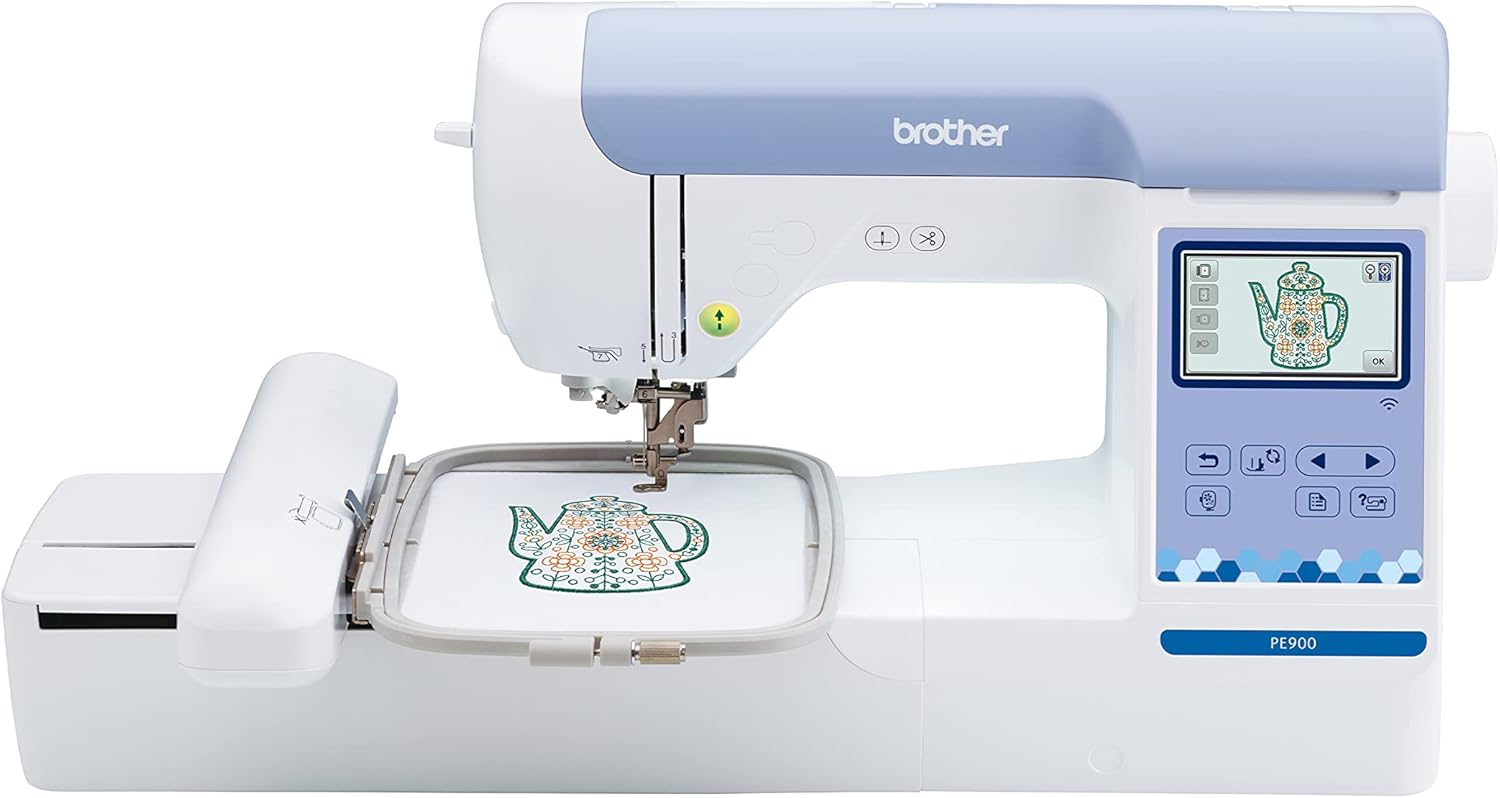
Brother PE900
- 5 in x 7 in
- Embroidery only
- 193 designs
Good fit if
- You only need embroidery and want a 5" x 7" field
- You want wireless design transfer
Skip it if
- You also want a sewing machine in the same unit
- Your designs fit in 4" x 4" and you want a smaller-field machine
Check price on AmazonRead our full review
Paid link. We may earn a commission.
Who should skip both: anyone who also wants a sewing machine in the same unit. Brother’s SE2000 lists the same 5″ x 7″ field with sewing stitches added; see our SE700 vs SE2000 comparison and our Brother models explained guide.
What we could not compare
- Stitch speed: Brother gives a top speed for the PE900 in its product description but none for the PE800, so we cannot say whether one stitches faster.
- Weight: both pages list 17.64 with no unit, so we have left it out.
- Long-term reliability and stitch quality: we do not have these machines in hand and have not yet compiled owner feedback for this comparison.
- Price: prices change often. Check the current price on the retailer’s page.
See How We Review for our methods.
FAQs
Is the Brother PE800 discontinued?
Brother’s U.S. PE800 page shows a Discontinued badge (checked November 15, 2026). The PE900 is Brother’s current 5″ x 7″ embroidery-only model in this comparison.
Do the PE800 and PE900 have the same embroidery area?
Yes. Brother lists a 5″ x 7″ maximum embroidery area for both.
How many built-in designs does each machine have?
Brother lists 138 built-in designs for the PE800 and 193 for the PE900.
Essential supplies for day-1 embroidery success
An embroidery machine arrives with minimal sample needles and starter thread, but completing custom embroidery requires proper stabilizers, embroidery needles, and dedicated polyester filament thread. Using standard sewing thread in an embroidery needle leads to bird nesting, thread breakage, and tension errors.
What You Need on Day 1: Essential Starter Supplies
New machines ship with minimal sample thread and scrap backing. To complete your first real project right out of the box without tension issues or thread breaks, these 4 verified supplies are essential:
Medium Cutaway Stabilizer (2.5 oz, 10" x 50 yd)
Mandatory permanent backing for all stretch fabrics, hoodies, polos, and tees. Prevents puckering and stitch distortion after washing.
View Stabilizer on Amazon ›40wt Polyester Embroidery Thread Set (40 Colors)
High-sheen, high-tensile polyester thread designed for 400-850 SPM speeds. Minimal breakage and resistant to chlorine bleaching.
View Thread Set on Amazon ›Pre-Wound Bobbins (Class 15 / Size A, 60wt)
Plastic-sided pre-wound bobbins with 60wt filament polyester thread. Ensures smooth rotation and consistent bobbin tension.
View Bobbins on Amazon ›Schmetz 75/11 Embroidery Needles (5-Pack)
Medium ballpoint with a specially shaped scarf and large eye to protect delicate 40wt thread at high embroidery speeds.
View Needles on Amazon ›As an Amazon Associate I earn from qualifying purchases. Affiliate links carry rel="sponsored nofollow".
Related guides
- Brother PE900 Review: A 5×7 Embroidery-Only Machine With Mixed Customer Reviews
- Brother PE800 vs Janome 500E: Embroidery Machine Comparison
- Brother PE800 Review and Buying Guide
- Janome 550E vs Brother Stellaire: Which Machine Fits
- Brother PE900 vs Poolin EOC06: Which Fits You?
- Brother PE900 vs Baby Lock Flare: Embroidery Machine Guide
- Brother PE540D vs PE535: Which Embroidery Machine Fits
- Brother Stellaire XE1 Review: What to Know Before You Buy
- Brother PE900 vs SE2000: Embroidery Only or Combo
Sources
- Brother USA product pages and specification tables for the PE800 and PE900, including carton contents (accessed October 11 and November 7, 2026; links rechecked November 16, 2026).
About the author

Jordan Hale is a pen name used by the site's operator. Jordan researches and edits the buying guides at Embroidery Machine Scout. Jordan compiles manufacturer specifications, user manuals, and patterns in owner feedback to compare home and small-business embroidery machines. Jordan does not physically operate the machines reviewed here; every recommendation states its sources and the date they were checked.