Brother PE900 Review: A 5×7 Embroidery-Only Machine With Mixed Customer Reviews
Brother PE900 review from Brother documentation, warranty terms, and 35 customer reviews: EMS Rating 7.3/10, 5x7 embroidery features, bobbin tension, and who should skip it.
 By Jordan Hale
Updated November 14, 2026
We earn a commission if you buy through links on this page, at no extra cost to you. Commissions do not affect how we rate products. As an Amazon Associate I earn from qualifying purchases. Learn more.
The Brother PE900 is an embroidery-only machine with a 5″ x 7″ embroidery field, 193 built-in designs, and 13 embroidery fonts. This Brother PE900 review is for buyers who already sew on another machine, or do not sew at all, and want more room than a 4″ x 4″ machine gives. We base it on Brother’s operation manual, specification table, warranty, and store page, plus 35 customer reviews; we have not used the machine ourselves.
EMS Rating: 7.3 out of 10
Our verdict: Consider. The documented features are strong, but customer reviews are more mixed than for Brother’s SE2000.
- Consider it if: you only need embroidery, want a 5″ x 7″ field, and like loading designs over Wi-Fi as well as by USB flash drive.
- Skip it if: you also want to sew on the same machine (the SE2000 has the same embroidery field and design count and adds a full sewing side), your designs fit in 4″ x 4″, or you need designs larger than 5″ x 7″.
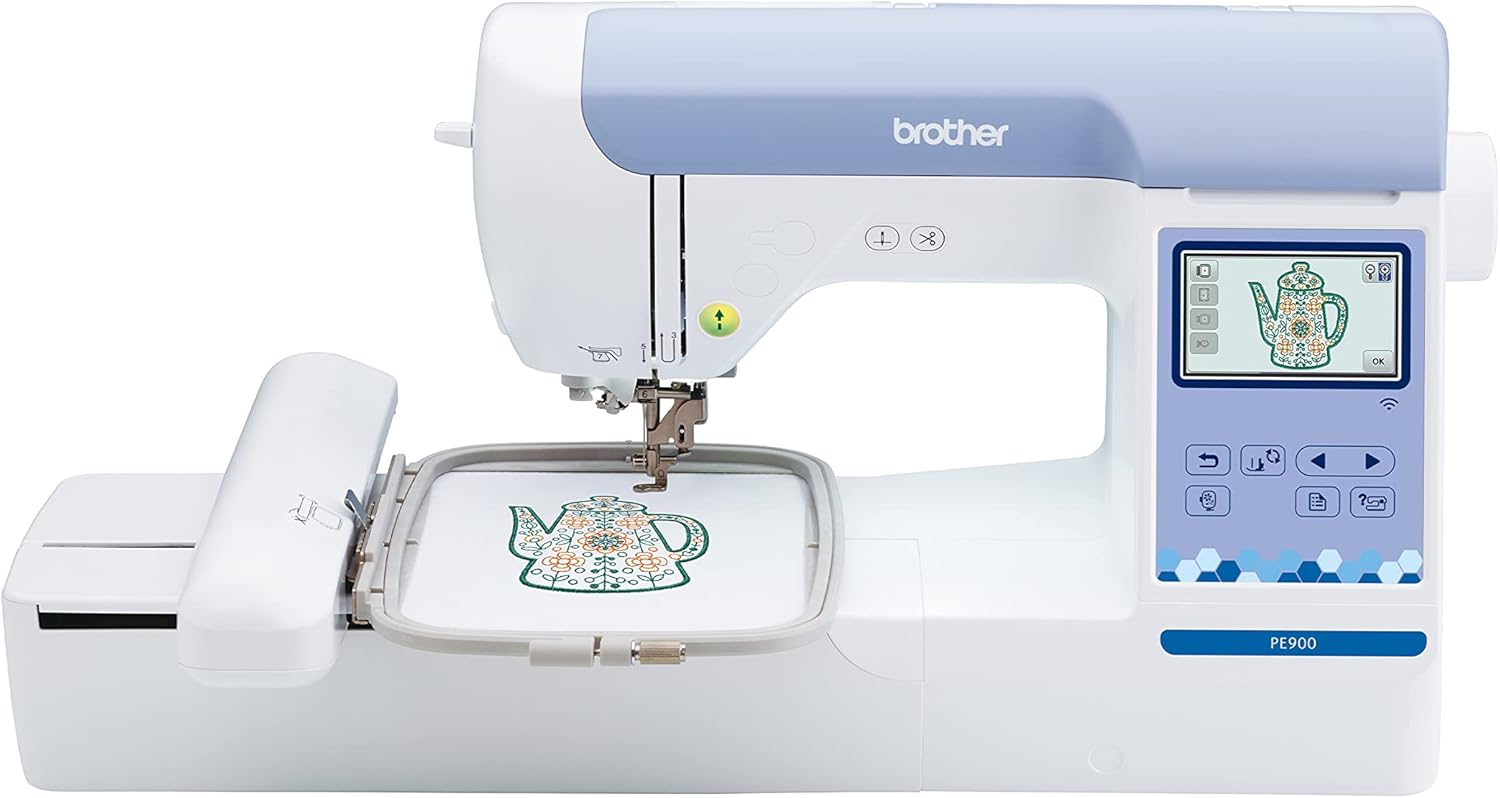
Brother PE900
- 5 in x 7 in
- Embroidery only
- 193 designs
Good fit if
- You only need embroidery and want a 5" x 7" field
- You want wireless design transfer
Skip it if
- You also want a sewing machine in the same unit
- Your designs fit in 4" x 4" and you want a smaller-field machine
Paid link. We may earn a commission.
Before buying from any retailer, including Amazon, check that the seller is an authorized Brother reseller in the United States, and check the return window. Brother’s warranty says products bought from other sellers may not be covered.
Brother PE900 review: how it scores
The EMS Rating uses the same six criteria for every machine, and the rules are on our How We Review page.
0
2
4
6
8
10
Area and hoops (25%)
6.5
Ease of use (20%)
8.5
Features (15%)
10.0
Support (15%)
7.0
Customer reviews (15%)
7.1
Value (10%)
4.0
Area and hoops (25%)
6.5
Ease of use (20%)
8.5
Features (15%)
10.0
Support (15%)
7.0
Customer reviews (15%)
7.1
Value (10%)
4.0
| Criterion | Weight | Score | Why |
|---|---|---|---|
| Embroidery area and hoops | 25% | 6.5 | 5″ x 7″ maximum field (Brother’s manual: 180 mm x 130 mm) with one 5″ x 7″ frame in the box; the optional frames Brother lists are not larger, so no bonus |
| Ease of use | 20% | 8.5 | Touch-panel LCD, USB and wireless design loading, needle threading system, thread cutter, printed manual and quick reference guide; the 3.7″ screen is under our 4″ mark, and Brother lists no on-machine tutorials |
| Features | 15% | 10.0 | 193 built-in designs, 13 embroidery fonts, reads .pes and .dst; as an embroidery-only machine its 7 points are scaled to 10 |
| Support and warranty | 15% | 7.0 | 1 year parts and labor, 2 years electronics, 25 years chassis; authorized service centers and online manuals |
| Positive customer-review share | 15% | 7.1 | 25 of 35 non-incentivized written reviews on Brother’s product page gave 4 or 5 stars (n=35) |
| Value: list price and missing supplies | 10% | 4.0 | Brother's U.S. store lists the PE900 in the upper price band of the machines we rate. Prices can change; check the retailer’s current listing before buying. The box includes white bobbin thread but no top embroidery thread or stabilizer |
On documents alone, the PE900 scores as well as the SE2000 on area, ease of use, features, and support. The gap in the overall rating comes from the customer-review share: 71% positive here, against 94% for the SE2000.
Key specifications
From Brother’s U.S. product page, specification table, and the PE900 operation manual (product code 888-K80), checked October 11 and 12, 2026.
| Spec | Brother PE900 |
|---|---|
| Type | Embroidery only (no sewing stitches) |
| Maximum embroidery area | 5″ x 7″ (180 mm x 130 mm) |
| Frame in the box | Large frame, 18 cm x 13 cm (7″ x 5″) |
| Built-in embroidery designs | 193 |
| Embroidery lettering fonts | 13 |
| Space to the right of the needle | 7.4″ |
| Maximum embroidery speed | 650 stitches per minute |
| Screen | 3.7″ color LCD, touch panel |
| Design loading | Wireless LAN; USB flash drive |
| Embroidery file formats read | .pes, .phc, .dst, .pen |
| Bobbin case | One, adjustable (no color on the screw) |
| Bobbin thread in the box | 90 weight, white |
| Warranty | 1/2/25 Year Limited |
What the PE900 does well, on paper
The 5″ x 7″ field fits longer names, centered chest designs, and motifs that a 4″ x 4″ machine would have to split. Our hoop size guide shows both sizes to scale. Brother documents several features that save time on multicolor designs:
- Thread color sorting. Brother describes this as changing the order in which a multicolor design is stitched to reduce color changes; the manual covers it under “Thread color sorting.”
- Jump stitch trimming. The machine trims the thread that jumps between parts of the same color, and the manual lets you choose the jump length at which trimming starts.
- On-screen editing. Brother lists letter editing, zoom, resizing, rotating, repositioning, and combining designs on the 3.7″ screen.
Designs load by USB flash drive or over Wi-Fi with Brother’s free Design Database Transfer software, which Brother lists for Windows 8.1, 10, and 11 (macOS is not listed). Brother’s Artspira mobile app can also send designs and lets you draw simple line designs up to 5″ x 7″. The manual lists .pes, .phc, .dst, and .pen as the embroidery data the machine loads; .dst files show no preview image or thread colors. Brother also sells a 4″ x 7″ magnetic frame that the product page lists as compatible, and Brother says the 7.4″ of space to the right of the needle makes that frame easy to hoop.
Bobbin tension: read this part of the manual early
Bobbin tension is the most common theme in the PE900’s critical reviews (see below), so it is worth knowing what Brother documents. The PE900 comes with one bobbin case, the type with no color on the screw, and white 90-weight bobbin thread. The manual says to use the included 90-weight bobbin thread or a recommended 90-weight thread, and it explains that this bobbin case can be adjusted when a different bobbin thread needs a different tension.
The adjustment is a small turn of the slotted screw on the bobbin case, about 30 to 45 degrees at a time: clockwise when bobbin thread shows on the top of the fabric, counterclockwise when the top thread loops and no bobbin thread shows underneath. The manual also has a separate embroidery tension setting for the upper thread. If you plan to switch to prewound bobbins, expect to spend some time on this.
What reviewers say
We read the 70 written English-language reviews on Brother’s PE900 product page on October 11, 2026, and recounted them on October 12 with the same result; a third check on October 23, 2026 found no new reviews. Brother labels 35 of them as incentivized; we set those aside. Of the remaining 35, posted between February 2023 and May 2026:
- 25 gave 4 or 5 stars, and 10 gave 3 stars or fewer.
- 10 described the machine as easy to use or suited to someone new to embroidery.
- 6 described adjusting bobbin or thread tension, or trouble with prewound bobbins, including 3 of the critical reviews. One positive review said the trouble stopped after the reviewer wound their own 90-weight bobbins.
- 5 reported a machine that failed or needed a repair within roughly the first six months; one of them also could not reach the local service center, and a separate critical review described an unhelpful customer service call.
- 2 reported the plastic needle threader lever breaking early on.
They come from Brother’s own product page, where buyers choose whether to post, so they show patterns, not rates. They are also why we suggest checking the seller’s return window before you buy.
Warranty and support
Brother’s standard limited warranty, linked from the PE900 page, covers parts, labor, and accessory items for 1 year, electronic components and circuit boards for 2 years (replacement labor excluded), and the chassis casting for 25 years. Service goes through a Brother Authorized Service Center, you pay to ship the machine there, and the warranty applies to the original owner of a machine bought from an authorized Brother reseller in the United States. The manual points to Brother’s support site for instruction videos and FAQs.
What you will need to add

Brother’s carton list includes white 90-weight embroidery bobbin thread and a dust cover, but no top embroidery thread and no stabilizer, so plan to buy both. If you want wireless transfer from a computer, you will need a Windows PC for Design Database Transfer; otherwise use a USB flash drive or the Artspira app. One critical review also complained that design software had to be bought separately.
How it compares
- Brother SE2000 (EMS 7.7): the same 5″ x 7″ field, 193 designs, and 13 fonts, plus 241 sewing stitches and a knee lifter, at a higher list price. See our SE2000 review and PE900 vs SE2000.
- Brother PE800: the older embroidery-only 5″ x 7″ model, which Brother’s U.S. store marks as discontinued. See PE800 vs PE900.
- Brother PE545 (EMS 6.5): embroidery only with a 4″ x 4″ field, at a lower list price. See our beginner embroidery machines guide and Brother models explained.
- Brother SE700: sews and embroiders, with a 4″ x 4″ field. See SE700 vs PE900.
- Baby Lock Flare: compared on field, designs and where each is sold. See Brother PE900 vs Baby Lock Flare.
- Poolin EOC06: compared on field, hoops, files and ratings. See Brother PE900 vs Poolin EOC06.
Brother PE545
4" x 4"
PE900, SE2000
5" x 7"
Brother PE545
4" x 4"
PE900, SE2000
5" x 7"
Who should not buy the Brother PE900
- Anyone who also wants to sew. The PE900 only embroiders; the SE2000 lists the same embroidery specifications and adds a sewing side.
- Anyone who wants to start stitching the day it arrives. Brother’s carton list has no top embroidery thread and no stabilizer, and wireless transfer from a computer needs Windows (macOS is not listed).
- Anyone who weights reliability stories heavily. Several owner reviews on Brother’s page describe bobbin or thread tension trouble or an early failure. They are individual reports, not failure rates, and owner feedback on the PE900 was less consistent than on the SE2000.
- Anyone on a tight budget. The PE545 is embroidery-only with a 4″ x 4″ field at a lower list price.
What we could not assess
How common early failures are: 5 reports among 35 reviews do not give a failure rate. Like every machine we review, this one is assessed from documents and owner reports, so stitch quality, noise, long-term reliability, and reviews outside Brother’s own site are beyond what we can judge; How We Review lists these limits.
Essential supplies for day-1 embroidery success
An embroidery machine arrives with minimal sample needles and starter thread, but completing custom embroidery requires proper stabilizers, embroidery needles, and dedicated polyester filament thread. Using standard sewing thread in an embroidery needle leads to bird nesting, thread breakage, and tension errors.
What You Need on Day 1: Essential Starter Supplies
New machines ship with minimal sample thread and scrap backing. To complete your first real project right out of the box without tension issues or thread breaks, these 4 verified supplies are essential:
Medium Cutaway Stabilizer (2.5 oz, 10" x 50 yd)
Mandatory permanent backing for all stretch fabrics, hoodies, polos, and tees. Prevents puckering and stitch distortion after washing.
View Stabilizer on Amazon ›40wt Polyester Embroidery Thread Set (40 Colors)
High-sheen, high-tensile polyester thread designed for 400-850 SPM speeds. Minimal breakage and resistant to chlorine bleaching.
View Thread Set on Amazon ›Pre-Wound Bobbins (Class 15 / Size A, 60wt)
Plastic-sided pre-wound bobbins with 60wt filament polyester thread. Ensures smooth rotation and consistent bobbin tension.
View Bobbins on Amazon ›Schmetz 75/11 Embroidery Needles (5-Pack)
Medium ballpoint with a specially shaped scarf and large eye to protect delicate 40wt thread at high embroidery speeds.
View Needles on Amazon ›As an Amazon Associate I earn from qualifying purchases. Affiliate links carry rel="sponsored nofollow".
Frequently Asked Questions
What problems do Brother PE900 owners report?
Of the 35 non-incentivized reviews on Brother’s product page (rechecked October 23, 2026), 6 described adjusting bobbin or thread tension or trouble with prewound bobbins, 5 reported a machine that failed or needed a repair within roughly the first six months, and 2 reported the plastic needle threader lever breaking early. 25 of the 35 gave 4 or 5 stars. These are individual reports, not failure rates, which is why we suggest checking the seller’s return window.
Is the Brother PE900 worth it?
It rates 7.3 out of 10 on our scores, with a 5″ x 7″ field, 193 built-in designs, and 13 embroidery fonts in an embroidery-only machine. If you also want to sew on the same machine, the SE2000 adds a sewing side with the same embroidery field.
Sources
- Brother USA PE900 product page, specifications, carton contents, list price, and customer reviews (specifications accessed October 11, 2026; price checked October 12, 2026).
- Brother PE900 Operation Manual, product code 888-K80, including the sections on thread tension, adjusting the bobbin case, jump stitch trimming, thread color sorting, and specifications.
- Brother Limited Warranty (Standard), linked from the PE900 product page.
- Brother support, Design Database Transfer information page.
- Customer reviews on the Brother USA PE900 product page: 70 written reviews, 35 labeled incentivized and excluded (accessed October 11, 2026; recounted October 12, 2026).
About the author

Jordan Hale is a pen name used by the site's operator. Jordan researches and edits the buying guides at Embroidery Machine Scout. Jordan compiles manufacturer specifications, user manuals, and patterns in owner feedback to compare home and small-business embroidery machines. Jordan does not physically operate the machines reviewed here; every recommendation states its sources and the date they were checked.