What Type of Embroidery Machine Do I Need?
Deciding what type of embroidery machine you need starts with one question: do you also want to sew? This guide compares a sewing and embroidery combo with a dedicated embroidery machine using manufacturer and listing information.
 By Jordan Hale
Updated November 14, 2026
We earn a commission if you buy through links on this page, at no extra cost to you. Commissions do not affect how we rate products. As an Amazon Associate I earn from qualifying purchases. Learn more.
Figuring out what type of embroidery machine you need comes down to how you plan to use it. If you want one machine that stitches seams and adds embroidery, a combo model makes sense. If embroidery is the whole point and you want a larger stitching field, an embroidery only machine is the better fit. This guide walks through the two main paths using manufacturer and listing information, so you can match the machine to your projects rather than the other way around.

Both machines below come from Brother, and the product listings describe each one as the successor to an earlier model. One replaces the SE600, the other succeeds the PE800. If you are still comparing brands, our Brother vs Janome comparison covers how their approaches differ before you commit to a platform.

Brother SE700 4x4 Embroidery Sewing Combo
- 4 in x 4 in
- Sew + embroider
- 135 designs
Good fit if
- Large built-in design and stitch library
- Wireless PC file transfer without USB
- Color touchscreen simplifies on-screen editing
- Bundle adds four hoops and 40 thread spools
- Compatible with Artspira and iBroidery
Skip it if
- 4 x 4 inch embroidery field limits larger projects
- Mid-range price positions it above entry machines
Paid link. We may earn a commission.
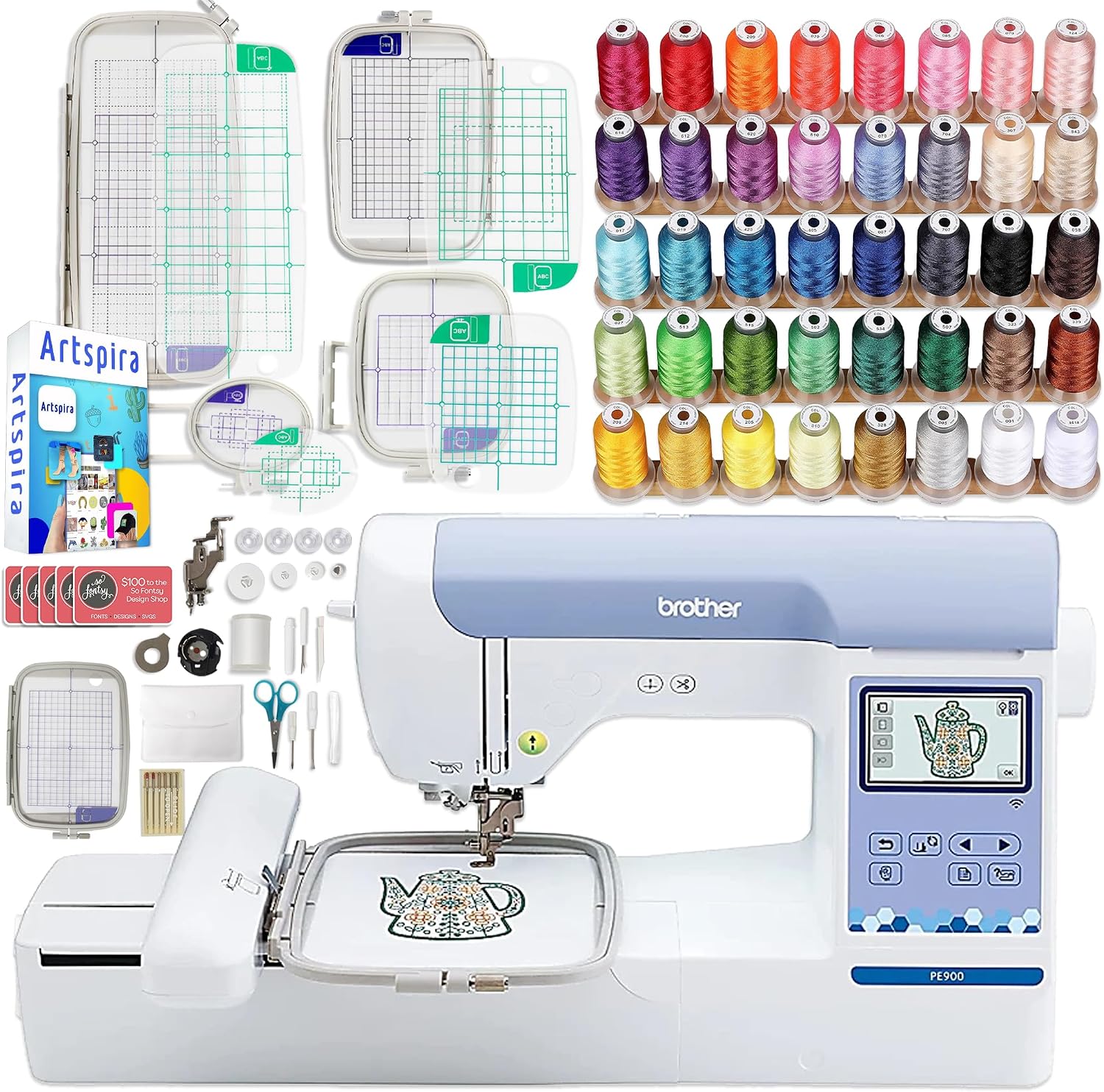
Brother PE900 5x7 Embroidery Machine Bundle
- 5 in x 7 in
- Embroidery only
- 193 designs
Good fit if
- Large 5 by 7 inch hoop area for bigger designs
- 193 designs and 13 fonts built in
- On-screen editing with zoom and letter editing
- Bundle includes five hoops and 40 thread spools
- Artspira app supports wireless design transfer
Skip it if
- Embroidery only, no sewing functions
- 20 pounds and 17 inches wide limits portability
Paid link. We may earn a commission.
Before you pick a model, work through the criteria below. They decide more about your day to day experience than any single feature list.
Sewing Combo or Embroidery Only
The first decision is whether you need a sewing machine at all. The Brother SE700 Combo Embroidery & Sewing Machine is a 4 inch by 4 inch combo unit with 103 built-in sewing stitches and 135 built-in embroidery designs. That means one footprint on your table covers garment construction, mending, and decorative stitching. For someone starting a hobby or working in a small space, that consolidation matters.
The Brother PE900 is an embroidery only machine with a larger library of built-in designs and 13 built-in fonts. Brother lists 193 built-in designs for it. If you already own a sewing machine you like, this is not a loss. If you do not, budget for a second machine or accept that all your stitching will be decorative.
| Spec (Brother product pages) | SE700 | PE900 |
|---|---|---|
| Machine type | Sewing and embroidery combo | Embroidery only |
| Embroidery field | 4 x 4 in | 5 x 7 in |
| Built-in embroidery designs | 135 | 193 |
| Built-in embroidery fonts | 10 | 13 |
| Built-in sewing stitches | 103 | Not applicable |
Embroidery Field Size
Hoop size sets the ceiling on what you can stitch in one pass. The SE700 works within a 4 inch by 4 inch field. Larger embroidery fields are listed for the PE900, while the SE700 tops out at 4 by 4, so check the hoop sizes in each bundle against the designs you plan to stitch.
Think about your typical project before you decide. Monograms, small logos, and pocket details fit comfortably in 4 by 4. If a design is wider than 4 by 4, the PE900’s 5 by 7 field gives you more room, so compare your design size to that field before you choose. Our guide to machines for monogramming and names goes deeper on matching hoop size to lettering work.
Built-in Designs and Fonts
Built-in content is what you can stitch on day one without any file transfers. The SE700 includes 135 embroidery designs, while the PE900 offers a larger design library plus 13 embroidery fonts. More fonts matter if you plan to add names and sayings directly from the machine rather than digitizing them yourself.
Both bundles include So Fontsy design cards for embroidery designs, and both list the Artspira app, which lets you draw patterns and send them to the machine wirelessly. Neither machine is limited to what ships in the box, but the built-in library is what you will lean on first.
Connectivity and File Handling
Wireless LAN is listed for the SE700, and the PE900 supports wireless transfer through the Artspira app. That lets you move designs from a phone or computer without a cable. The PE900 listing also mentions iBroidery compatibility and built-in memory space for storing designs on the machine.
If you plan to buy or download designs regularly, check which file formats each machine reads before you commit. Our explainer on embroidery file formats covers what to look for in a listing.
Included Hoops and Accessories
Hoop sets change how much you can do out of the box. The SE700 bundle listing includes two 4 by 4 hoops, a 4 by 6.75 hoop, and a 1 by 2.5 hoop, plus 40 polyester thread spools and a set of presser feet for sewing. The 4 by 6.75 hoop is larger than the machine's listed 4 by 4 embroidery field, so do not assume you can stitch designs that size.
Bundle contents come from the seller's listing and may differ from what Brother ships with the machine alone. Confirm the hoop you need before you plan a project around it.
Display and Ease of Use
The SE700 uses a 3.2 by 1.8 inch color LCD touch screen, and the PE900 uses a 3.7 inch touch screen LCD. If on-screen editing matters to you, the larger screen is worth weighing.
Who should skip each type
- Skip the combo type if you regularly stitch designs larger than 4 x 4 inches.
- Skip the embroidery-only type if you also need to sew seams and hems and have no other sewing machine.
- Skip both Brother models here if you need a multi-needle machine for production work.
What we could not assess
Stitch quality, noise and long-term reliability, because we compare machines from listings and manufacturer documents, not our own use. The “successor” statements about the SE600 and PE800 come from the Amazon listings; we did not find them on Brother’s product pages. How We Review lists the limits of our method.
Why You Should Trust Us
This guide is built from manufacturer specifications and product listing details. We do not conduct our own product trials. We compare the features each brand publishes, note what each bundle includes and omits, and explain which user each machine suits. We do not assign scores or rankings that the data cannot support.
Where a detail is not listed, we say so rather than guess. That keeps the comparison honest and lets you verify anything before you buy.
Final Thoughts
For most people asking what type of embroidery machine they need, the answer depends on whether sewing is part of the plan. The Brother SE700 is a sewing and embroidery combo, so it covers both in one unit, and its listing shows a hoop set plus 103 sewing stitches alongside 135 embroidery designs. It suits hobbyists, small space owners, and anyone who wants to mend and embellish without buying twice. Skip it if you need a field larger than 4 by 4 or already own a sewing machine you love.
The Brother PE900 is an embroidery only machine with a 5 by 7 field, so its listing is the one to read if sewing is not part of your plan. Its listing shows a 5 by 7 field and 13 built-in fonts, so compare those with the designs you want to stitch. The bundle also lists a 12 by 5 hoop, which is larger than the machine's 5 by 7 field, so treat 5 by 7 as the real stitching limit. Skip it if you also need to sew seams or if the smaller hoop set on the combo already covers your projects.
Whichever you choose, plan for stabilizer and thread as part of the setup. Our guide to stabilizer types by fabric is a useful next read once the machine arrives.

Related guides
- Embroidery Machine vs Sewing Machine: What Each Does and Which You Need
- Embroidery Machine vs Cricut: What Each Makes and Which to Buy First
- Embroidery Machine vs Hand Embroidery: Which to Choose
- Single-Needle vs Multi-Needle Embroidery Machines: Which One Fits What You Make
- How Does a Machine Embroidery Machine Work? A Clear Guide
- How Much Does an Embroidery Machine Cost? Prices by Tier, Checked at the Makers
- Embroidery Machine Hoop Sizes Explained: 4×4 vs 5×7 and What Fits
- Embroidery Machine Dealer vs Amazon: What to Know
- Embroidery Machine US Model vs International Model
FAQs
Is a combo machine or an embroidery only machine better for beginners?
A combo machine handles both sewing and embroidery in one unit, so check whether you need sewing stitches as well as embroidery before you choose between a combo and an embroidery only model. The SE700 includes sewing feet and 103 stitches alongside its embroidery features, which lets you practice both skills on one device. Choose embroidery only if you already sew and want a larger field.
How large a hoop do I need for names and monograms?
Small lettering fits in a 4 by 4 field, which the SE700 provides. Longer names or text spanning a towel or tote panel usually need the 5 by 7 field on the PE900. Check the design width in your software before hooping, and see our monogramming guide for more detail.
Can I transfer designs to these machines wirelessly?
Yes, according to the listings. The SE700 lists wireless LAN, and the PE900 supports wireless transfer through the Artspira app. Both let you move designs from a phone or computer without a cable. Confirm the supported file formats in the manual before you download designs.
Sources
- Brother USA product pages: Brother SE700 and Brother PE900 (read November 14, 2026).
- Amazon product listings for Brother SE700 4×4 Embroidery Sewing Combo (B0FR9T37F4), Brother PE900 5×7 Embroidery Machine Bundle (B0FR9SZHGF), including listed specifications, features, and included accessories (accessed October 31, 2026).
This article was written by the Embroidery Machine Scout editorial team from manufacturer and listing information. We do not conduct our own product trials.
About the author

Jordan Hale is a pen name used by the site's operator. Jordan researches and edits the buying guides at Embroidery Machine Scout. Jordan compiles manufacturer specifications, user manuals, and patterns in owner feedback to compare home and small-business embroidery machines. Jordan does not physically operate the machines reviewed here; every recommendation states its sources and the date they were checked.